Baby Squeaks: A Colorful SVG Font for Modern Design
In the competitive landscape of visual design, capturing a viewer's attention instantly is crucial. Imagine a typography asset that doesn't just convey words but radiates personality and charm through color and form. This is precisely what the Baby Squeaks font delivers. Designed with a professional graphic design workflow in mind, this full-color SVG font moves beyond traditional monochrome text, offering a vibrant, ready-to-use color palette that can elevate branding, packaging, and digital content with a single keystroke.
Understanding the Full-Color SVG Format
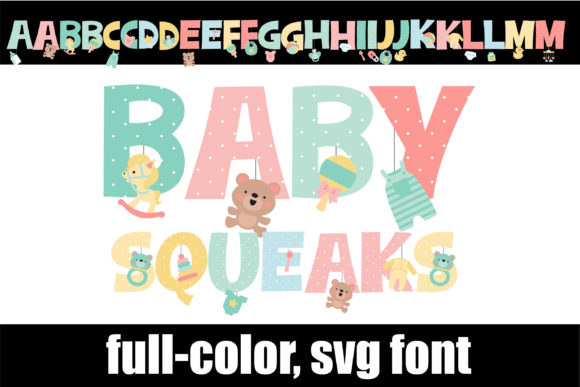
The power of Baby Squeaks lies in its underlying technology. As an OpenType full-color (SVG) font, it embeds rich vector graphics directly into the font file. Unlike standard fonts that require manual coloring for each letter, this asset comes pre-rendered with a pastel color palette featuring cute baby toys and supplies. For designers, this means the visual hierarchy is established immediately; the typography acts as both text and illustration.
Installation is seamless for professionals. Whether you are a Mac user utilizing FontBook or a Windows user relying on the Control Panel or a preferred font manager, the .otf file installs just like any standard typeface. It is vital to note, however, that compatibility is key. Programs like Adobe Photoshop, Illustrator, Silhouette Studio, and Quark currently support these rich visuals. In non-compatible software, the font will default to black, ensuring the text remains functional even if the color effects are not visible.
Practical Applications for Creative Projects
The versatility of a decorative, colorful font like Baby Squeaks extends across numerous design disciplines. Its whimsical aesthetic makes it an ideal choice for projects targeting family-oriented audiences, children’s products, or lighthearted lifestyle brands.
- Brand Identity and Logo Design: Create memorable logos that stand out on shelves or screens without needing complex layering of text and icons.
- Packaging Design: Enhance product appeal for baby supplies, confectionery, or party favors with typography that communicates joy instantly.
- Social Media and Digital Marketing: Stop the scroll with eye-catching headers and call-to-action text that pops against standard backgrounds.
- Web and UI Design: Use the font sparingly for hero sections or specific UI elements to inject personality into a user experience without overwhelming the interface.
- Editorial and Print Design: Add flair to magazine spreads, greeting cards, or nursery wall art.
Tips for Selecting and Using Color Fonts
While Baby Squeaks offers a stunning visual out of the box, successful integration into a design system requires strategy. To maintain a polished and professional presentation, consider the following recommendations:
- Check Compatibility: Always test the font in your specific software environment before committing to a final design layout. Verify that the color renders correctly in your export settings.
- Maintain Readability: Decorative fonts are best suited for headlines, subheadings, or short bursts of text. Avoid using them for long-form body copy where legibility is paramount.
- Complement the Palette: Since the font includes a fixed pastel palette, ensure your background colors and supporting design elements harmonize with these tones. High-contrast backgrounds often work best to let the font shine.
- Access Alternates: Don't forget to explore the second upper and lower alt case available via your system’s character map. Swapping characters can help you avoid repetition and create a more organic, hand-crafted feel in your typography.
Ultimately, the goal of any creative asset is to enhance communication. By incorporating specialized typography like Baby Squeaks