Looking Sharp: Elevate Your Designs with Whimsical Color Fonts
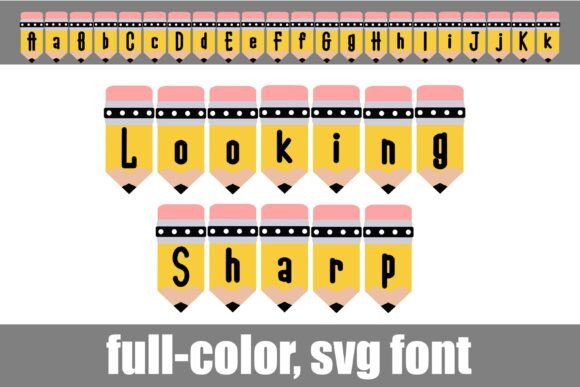
In the crowded landscape of digital design, capturing attention requires more than just good ideas—it demands visual distinction. A font that combines playful artistry with professional execution can transform a mundane layout into a memorable experience. Enter Looking Sharp, a full-color SVG font that reimagines typography as a tactile, craft-inspired element. This whimsical font features letters designed as pencils, each rendered in vibrant, multi-colored detail, offering designers an immediate way to inject personality and energy into their work.
Unlike traditional typefaces, Looking Sharp is an OpenType full-color (SVG) font. This means it contains vector-based color data, allowing the pencil-themed letters to display a rich palette right out of the box. The font includes an alternate case of additional colors, accessible through your system's character map or software like Silhouette Studio's glyph map. This flexibility empowers designers to fine-tune their color choices, ensuring harmony with a project's overall color palette and brand identity.
Practical Applications for Modern Design
The true value of a unique asset like Looking Sharp lies in its application across diverse creative projects. Its crafty, approachable aesthetic makes it particularly effective for designs that aim to feel friendly, educational, or inventive. Consider its impact in these scenarios:
- Branding and Logo Design: Perfect for children's brands, educational platforms, stationery companies, or any business wanting to convey creativity and hands-on engagement.
- Social Media Content: Create scroll-stopping graphics for posts, stories, and ads that need a burst of visual personality to stand out in a feed.
- Marketing Materials: Enhance flyers, posters, and email headers for workshops, school events, or creative sales promotions with an instantly recognizable style.
- Packaging Design: Ideal for artisanal products, DIY kits, or anything that benefits from a handcrafted, authentic feel on its label or box.
- Editorial Layouts: Use for chapter headings in children's books, magazine features on art and craft, or blog post titles to draw readers in.
Integrating SVG Fonts into Your Design Workflow
Adopting new technology should streamline, not complicate, your process. Installing Looking Sharp is straightforward: the .OTF file installs like any standard font via FontBook on Mac or through your font manager or Control Panel on Windows. A key consideration for professionals is program compatibility. While color fonts render in full glory in supported applications like Adobe Photoshop, Illustrator, Silhouette Studio, Quark, and Inkscape, they will appear as black in non-compatible programs. Even in compatible software, the font preview might show in black; the colors will display correctly once you type on your canvas.
When incorporating such a distinctive font, balance is crucial. Use it strategically for headlines, logos, or accent text rather than for long body paragraphs to maintain readability. Pair it with a clean, neutral sans-serif or serif typeface for supporting text to create a strong visual hierarchy. This approach ensures the whimsical nature of the pencil letters enhances your message without overwhelming it, a fundamental principle in effective graphic design.
Tips for Effective Use
- Context is Key: Align the font's playful tone with your project's goals. It's perfect for a toy store's branding but less so for a corporate law firm's annual report.
- Color Harmony: Utilize the alternate glyph colors to match the font to your existing brand colors or design palette, ensuring a cohesive and polished result.
- Scale with Confidence: As a vector-based SVG font, Looking Sharp scales infinitely without loss of quality, making it suitable for everything from small social media icons to large-scale print banners.
Ultimately, thoughtful design choices are about communication. Selecting a creative asset like Looking Sharp is a deliberate decision to add warmth, character, and a touch of whimsy to your visual language. In a digital world often dominated by minimalism, a well-crafted, full-color font can be a powerful differentiator, helping your brand or project connect with its audience on a more human and engaging level. By understanding its capabilities and applying it with intention, you can turn simple text into a compelling part of your design narrative.